
Smart AI Use for University Reports | Prompt Basics and Choosing ChatGPT, Claude, or Geminiblog
Smart AI Use for University Reports | Prompt Basics and Choosing ChatGPT, Claude, or Gemini
A clear guide for university students who want to use AI safely and effectively in reports, covering prompt basics and how to choose among AI models.
Smart AI Use for University Reports | Prompt Basics and Choosing ChatGPT, Claude, or Gemini
Using AI for university reports is no longer unusual. It can help organize topics, create possible outlines, suggest alternative wording, and assist with review. However, using AI simply because it is convenient can also produce writing that misses the assignment or contains weakly supported claims, which may ultimately lower the quality of the work.
For this reason, what truly matters in university report writing is not the mere use of AI, but deciding how far AI may assist and where your own judgment must take overmaking this boundary clear. AI is not a magical tool that automatically creates a finished product; it is safer to use it as a tool for organizing thoughts and supporting parts of the process.
This article how to use AI for university reports、basic AI prompt design、how to choose among ChatGPT, Claude, and Gemini、AI use for university assignmentsWith search intentions such as these in mind, this article organizes smart AI use for university reports, with particular attention to Prompt Basicsand How to Choose ChatGPT, Claude, or Geminiand explains them in detail.
What to Consider First When Using AI for University Reports
In university reports, course materials, textbooks, assigned literature, and lecture content take priority. No matter how convenient AI may be, it does not override the assignment conditions or the issues emphasized by the instructor. In fact, the more you use AI, the more carefully you need to understand what evidence supports what you write.
Before asking AI anything, interpret the assignment prompt in your own words. Identify the topic, scope, whether the task requires comparison or analysis, and whether specific examples are required. Doing this first makes AI output much easier to evaluate and use appropriately.The usefulness of AI depends heavily on how carefully the task is organized before the prompt is written.This is the better way to think about it.
Where AI Can Be Used Productively in University Report Work
For university students, AI can be especially useful at two stages: when ideas are not yet organized and after a draft has been written. In the first stage, it can help list possible issues, compare structures, and organize questions. In the second, it can help identify weak transitions, repeated expressions, insufficient explanations, and difficult-to-read passages.
The more dangerous approach is to have AI generate the entire body from beginning to end. This can produce polished prose while leaving the student's understanding shallow, making it difficult to explain the paper when questioned.AI can be strong at supporting drafts and organization, but it should not be treated as the party responsible for the final submitted text.This sense of boundary is important.
Basic Prompt Design for University Reports
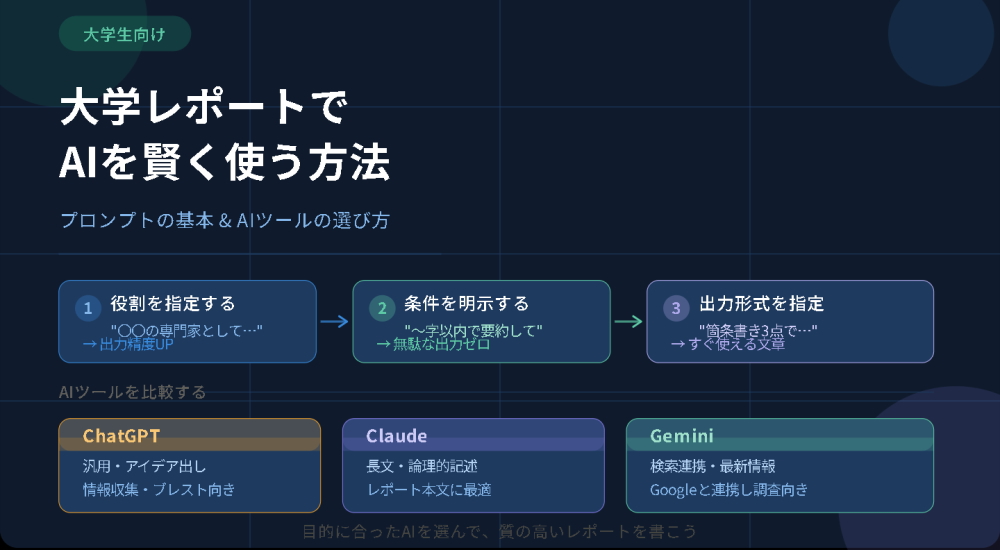
How well AI can support your work depends greatly on how the prompt is written. Vague requests tend to produce vague responses. More specific conditions generally lead to output that is easier to evaluate and use. For university reports, it is especially important to clarify the purpose, conditions, reference scope, and output format.
Simply understanding the basics of prompt design can make AI use in university reports much more consistent.Putting into words exactly what you want AI to do is itself part of preparing the report.This point should also not be overlooked.
1. Limit the Request to One Purpose
First, narrow the purpose of the request. Rather than broadly asking AI to “make my report,” ask for one task such as “create an outline,” “organize what this assignment prompt means,” or “identify weak points in my own writing.” Output tends to be more stable when the role is limited.
In university report writing, Assign only one role in each prompt.This also makes the result easier to use later.
2. Include the Assignment Conditions Specifically
Next, state the topic, word count, writing style, course, scope, submission format, and other conditions specifically. In a university report, even a small mismatch in these conditions can pull the entire paper away from the assignment.
For example, specifying conditions such as “about 1,200 Japanese characters,” “plain ‘da/dearu’ style,” “for a first-year university student,” “for a welfare policy course,” and “limited to the course materials” can substantially reduce irrelevant output.The more specific the conditions, the better.It is reasonable to think this way.
3. Specify the Range of Information AI May Use
When using AI for a university report, it is safer to specify the permitted reference scope, such as “use only the course materials,” “use only my notes,” or “organize only the key points from the assigned reading.” Otherwise, AI may expand too far into general information and drift away from the course.
In university assignments, faithful organization within the assigned scope is often more valuable than broad general knowledge.This happens frequently.
4. Specify the Desired Output Format
Rather than using AI output directly as body text, university students can more easily work with headings, key points for each paragraph, lists of suggested improvements, or checklists. These formats preserve room for editing and make it easier to reconcile the suggestions with your own understanding.
Useful instructions include “structure only, not body text,” “three options in bullet points,” “divide into introduction, body, and conclusion,” or “identify only the problems.”Ask for material that helps you think, not a finished paper.This is a smarter way to use the tool.
5. State What Content You Do Not Want Included
When using AI, adding restrictions such as “do not include information with an unverifiable source,” “do not invent references,” “do not add theories outside the course,” and “do not make overly categorical claims” can help prevent unnecessary expansion.
AI systems tend to fill gaps when they can, so State what you do not want AI to do as well as what you want it to do.this is especially important in university report writing.
AI Prompt Examples for University Reports
Below are prompt examples that can be used relatively safely as support for university reports. All are designed to help organize the student's thinking rather than delegate the entire paper.
When You Want an Outline
“Please create an outline for a university report. The topic is ‘The Effects of Population Aging on Local Communities.’ I plan to write about 1,200 Japanese characters in the plain ‘da/dearu’ style. Do not write the body. Please provide only the headings for the introduction, body, and conclusion, together with the key points to address in each paragraph. Do not expand too far into generalities, and limit the main issues to no more than three.”
When You Want Your Own Draft Reviewed
“Below is a draft of a university report that I wrote myself. Without adding new content, please identify places where the logic jumps, expressions that are repeated, and parts that need more explanation. Do not rewrite it as a finished paper; list only the points that should be improved.”
When You Want Help Interpreting the Assignment Prompt
“Please organize what the following university report assignment prompt requires. Separate necessary tasks such as comparison, analysis, specific examples, and reference to course content. Do not write the body of the report.”
How to Choose ChatGPT, Claude, or Gemini
A common question when using AI for university reports is, “Which model should I use?” In practice, it is more useful to choose according to the task than to look for one universally strongest model.The selection criterion should be what you want the model to do..
Who May Find ChatGPT Useful
ChatGPT can be useful for students who want to organize ideas through repeated dialogue. It works well for processes such as interpreting assignment prompts, discussing report structures, comparing possible openings for an introduction, and identifying improvements in a draft step by step.
They can therefore work well with processes such as “have not yet decided what to write” or “want to shape the report through discussion.” It can be used much like a brainstorming partner.It may be convenient for students who
Who May Find Claude Useful
Claude can be useful for students who want to organize longer text or sets of notes and consider a calm, coherent direction for the writing. Students may find it convenient when a draft has become too long, when several issues need to be summarized, or when they want to reorganize material into a more readable sequence.
They may be especially useful for organizing long text, extracting key points, and stabilizing the toneIt may suit students who prioritize these tasks. However, content accuracy and citation consistency must still be checked personally.
Who May Find Gemini Useful
Gemini can be convenient for students who primarily work in Google environments such as Google Docs and Google Drive. If you normally write reports in Google Docs, the ability to incorporate AI support into that workflow may be useful.
They can therefore work well with processes such as students who want help organizing notes or drafts within a Google-centered workflowIt may be easy to use for these purposes. For students who prioritize compatibility with their existing environment, it can be one option.
For University Reports, the Practical Approach Is to Use Different Tools for Different Tasks
In university report work, there is no need to commit to only one of ChatGPT, Claude, or Gemini. It may be more practical to use ChatGPT for interactive discussion and outlining, Claude for organizing longer text, and Gemini for a Google Docs-centered workflow.
Regardless of the AI used, however, one point remains common: AI cannot provide academic grounding that supersedes course materials and assigned readings.AI model comparisons matter less than designing how the tool will be used.
Precautions When Using AI for University Reports
Because AI-generated prose can look polished, students may be tempted to skip content verification. University reports still require a final check of whether the paper answers the question, stays aligned with course content, contains unverifiable claims, matches citations to references, and includes any expressions the student cannot explain.
Before submission, Do not ask whether the text “looks AI-written”; ask whether the report contains only content you genuinely understand.use this as the basis for the final review.
Summary | Smart AI Use for University Reports Depends on Prompt Design and Tool Selection
The most important principle of smart AI use for university reports is not to leave the work entirely to AI. Reading the assignment, checking course content, reading the literature, planning the structure, and rewriting the draft yourself remain essential even when AI is available.
Once those basics are in place, purpose-specific prompts and appropriate use of ChatGPT, Claude, or Gemini can help improve both efficiency and quality.Students who use AI intelligently still finish by checking the work with their own judgment.This attitude is one of the most important skills for university report writing in the AI era.
Points to Check to Improve the Reliability of This Article
When applying “Smart AI Use for University Reports | Prompt Basics and Choosing ChatGPT, Claude, or Gemini” to a report, paper, or assignment, do not copy the article text. Verify supporting evidence using primary sources, official materials, and academic literature, and reconstruct the content to fit your own assignment requirements.
| ConfirmItem | What to Check | How to Use It in a Report |
|---|---|---|
| Accuracy of Information | Check whether the concepts, figures, systems, and cited sources in the text actually exist and are consistent with the latest information. | Add references and footnotes so that the relationship between claims and supporting evidence is clear. |
| Consistency with Assignment Requirements | Check that the work complies with the course topic, word count, required readings, writing style, citation format, and submission format. | Use a structure in which the introduction presents the question, the body develops the evidence, and the conclusion answers the question. |
| Originality / Discussion | Check that the discussion goes beyond general explanation and connects to the course content or your own research question. | Add, in your own words, why you think so and what limitations remain. |
| Transparency About AI Use | Be able to explain what parts involved generative AI, how sources were checked, and whether the text was rewritten. | Treat AI output not as a finished product but as assistance for research, structuring, and revision. |
Reference Materials / Verification Sources
The following are public, academic, and official sources worth checking when using the content of this article in a report or paper. If you cite them, format the citation according to the requirements of the institution where you will submit the work.
- Ministry of Education, Culture, Sports, Science and Technology: “Handling of Generative AI in Teaching and Learning at Universities and Colleges of Technology”: provides basic guidance on handling generative AI in university and college classes, reports, examinations, and related educational settings.
- Agency for Cultural Affairs: “AI and Copyright”: a public source for considering risks involving AI-generated content, copyright, plagiarism, and similar wording.
- OpenAI「A Student's Guide to Writing with ChatGPT」: provides guidance on using ChatGPT as a learning aid and for improving writing.
- Google NotebookLM Official Website: official information on an AI research tool that summarizes and answers questions based on materials provided by the user.
- Elicit Official Website: official information on an AI research-support tool used to search, summarize, and extract information from academic papers.
- Zotero Official Website: official information on a reference-management tool used to collect, organize, cite, and share references.
Related Services / Internal Links
In academic writing, not only appearance but also citations, evidence, logic, and compliance with submission requirements directly affect evaluation. Please review the related pages as well.
AI Report / Paper ConsultationUniversity Report SupportGraduation Thesis / Master's Thesis Writing SupportAcademic Paper and Literature SearchFree Quote / Consultation
FAQ
Can I submit a report generated with generative AI as it is?
Submitting it unchanged is not recommended. Check the rules of your university and course, treat AI output as an outline or draft, verify sources, and reconstruct the content in your own words.
Can references generated by AI be trusted?
It is risky to trust them without verification. AI may produce nonexistent references or incorrect bibliographic details, so confirm both existence and content using sources such as CiNii, J-STAGE, Google Scholar, PubMed, and publisher websites.
What matters if I want to avoid problems or suspicion regarding AI use?
The important point is not to evade AI detection, but to keep records of how AI was used, check applicable rules, verify evidence, connect the writing to course content, and add your own analysis.
Contact
To date, we have supported clients throughout Japan and overseas.over 10,000 casesof academic support requests. Experienced consultants carefully listen to your needs and provide prompt, appropriate support at reasonable fees.
Ibooks members across Japan will support you responsibly.
We send the profile of the responsible staff member when you apply.
When orders are busy, phone lines may be difficult to connect. We will reply in order, so urgent inquiries should be sent by
