
Filtering Gmail's Spam Foldergmail
December 3, 2020 Checking and Restoring Emails Classified as Spam
Checking and Restoring Emails Classified as Spam
Gmail provides spam filtering by default, and incoming messages judged to be problematic are automatically treated as spam.
However, legitimate messages may sometimes be classified as spam by mistake, while unwanted messages may occasionally pass through the filter.
This section explains how to report a message as spam and how to restore a message that was incorrectly classified as spam.
Check Messages Filtered as Spam
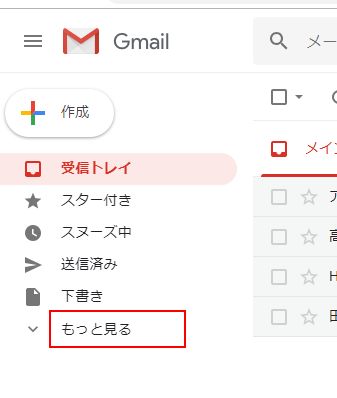
Incoming messages normally appear in the inbox unless filters or other settings are applied, but messages judged to be spam are handled separately instead of appearing in the inbox. To check messages filtered as spam, click “More” on the left side of Gmail.
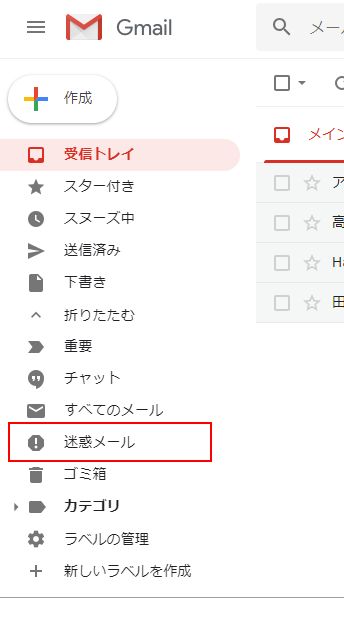
In the list of labels on the left side of the screen, click the “Spam” label.
Remove a Message From Spam
Some messages in the spam folder may have been classified there by mistake. Such messages can be marked as not spam.
Open the spam folder and select the message you want to restore. After selecting it, several icons appear above the message list; click “Not spam.”
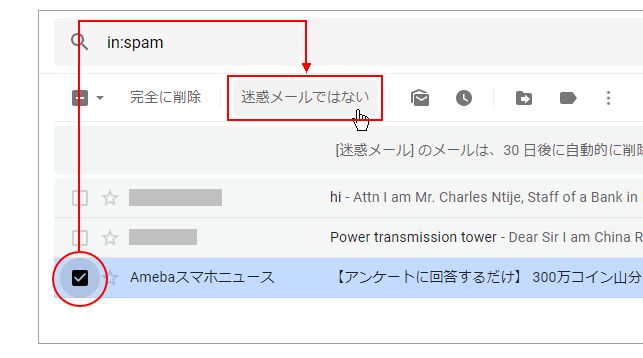
The spam designation is removed from the selected message, and it no longer appears in the spam folder.
Check Why a Message Was Classified as Spam
When you open a message in the spam folder, Gmail may display the reason it was classified as spam. For example, a message may show a notice such as “Many messages from (domain name) were previously identified as spam.”
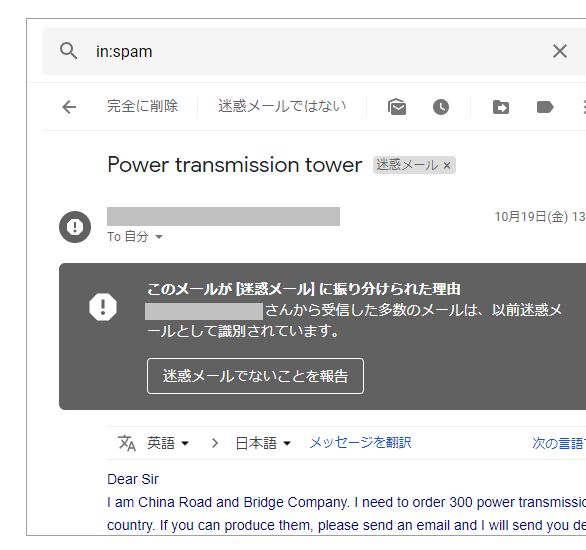
If an important message has been incorrectly classified as spam, check the reason shown by Gmail.
Reference SiteChecking and Restoring Emails Classified as Spam
Contact
To date, we have supported clients throughout Japan and overseas.over 10,000 casesWe have supported a wide range of academic requests, including graduation/master’s thesis research and report/paper support. Our experienced consultants work closely with clients to meet their needs. We provide prompt and accurate support at reasonable prices, and our Ibooks team members throughout Japan take responsibility for assisting each client.
We send the profile of the responsible staff member when you apply.
For Undergraduate / Master's Thesis Research Support, Report Support, and Paper Support, choose iBooks Academic Support!
When orders are busy, phone lines may be difficult to connect.
We will reply in order; if urgent, please contact us by
