
Gmail Delivery Errors | SMTP Codes, SPF/DKIM & Current Sender Requirementsgmail
Gmail Delivery Errors | SMTP Codes, SPF/DKIM & Current Sender Requirements
This notice was originally published on May 10, 2023 and has been updated using Google’s official guidance as of September 4, 2026. When mail to Gmail is rejected or not delivered, start with the SMTP error code in the bounce message and troubleshoot authentication, DNS, TLS, recipient details, and sender requirements systematically.
What to Do When Gmail Returns an Error and Cannot Send
Since around May 2022, we have seen an increase in inquiries stating thatAn email sent to Gmail returns an error message」「The automatic reply from the contact form results in an error」「A delivery email does not arriveemails sent to Gmail are returned with an error. At the same time, emails sent from us to customers have also sometimes resulted in errors.
Gmail has strengthened security in response to the growing problem of spoofed email, and in many cases this appears to be a factor in rejected messages.
If you can send mail through Gmail but receive an error message, please refer to the following items.
- Incorrect email address (for example, periods or the @ symbol entered incorrectly)
- Recipient has blocked incoming mail
- Attachment exceeds the size limit
Note: This can also occur when URLs are used in a footer.
When You Can Receive but Cannot Send
If Gmail can receive mail but cannot send, please try the following.
- Check the internet connection
- Log out of Gmail and log in again
- Try sending again
- Check whether the recipient’s email address is correct
- Check that the attachment does not exceed the size limit
What to Do If Email from Us Does Not Reach Gmail
Emails from us—including automatic replies from the contact form, correspondence with customers, payment-confirmation emails, and delivery emails—may contain URLs or attachments. As a result, Gmail may identify them asSpam Mail“junk mail” or “spam,” in which case they may not be delivered.
For this reason, we may sometimes remove certain URLs before sending. Thank you for your understanding.
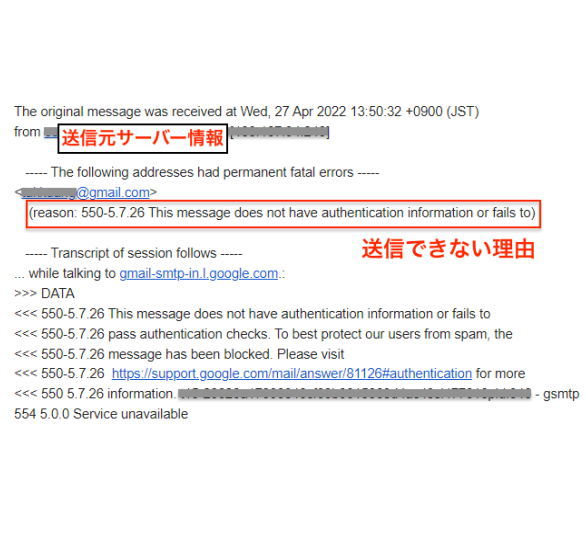
How to Configure Email Authentication
In conclusion, email authentication such as SPF and DKIM needs to be configured. Note: SPF (Sender Policy Framework) is a mechanism for checking whether the sending domain of an email has been spoofed. DKIM (DomainKeys Identified Mail) is a domain-authentication technology in which the sender applies a digital signature when sending email and the recipient verifies that signature, helping detect sender impersonation and message tampering.
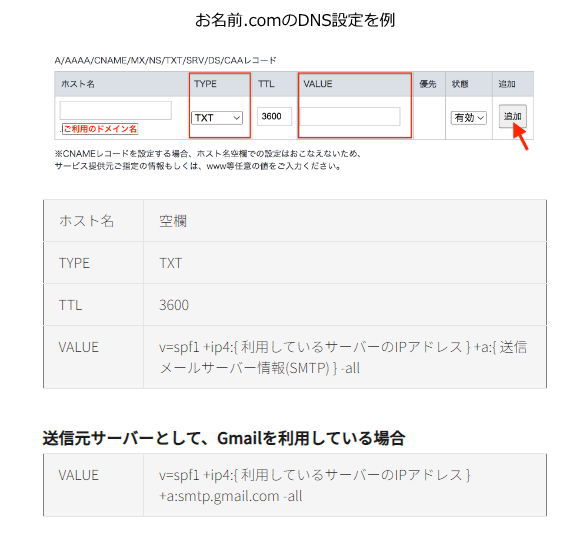
Reference SiteConfigure an SPF Record
Last updated: September 4, 2026
Key Points at a Glance
| 1. Read the bounce | Identify the SMTP status code and Google’s explanation. |
|---|---|
| 2. Check basics | Verify recipient, attachments, sending rate, DNS, and TLS. |
| 3. Check authentication | Compare SPF/DKIM and, where applicable, DMARC settings with Google’s sender requirements. |
Primary / Academic / Official Sources
Use the submission rules of your university, department, or target journal first. The sources below are verification starting points; read the original material before citing it.
Frequently Asked Questions
What do 4xx and 5xx codes mean?
They are SMTP status/error codes. The cause differs by code, so use Google’s official error-code documentation rather than guessing.
Will SPF alone guarantee delivery?
No. Google’s requirements also involve DNS, TLS, message format, sending practices, and—depending on volume—additional authentication requirements.
What if the message lands in spam instead of bouncing?
Authentication matters, but content, sender reputation, sending history, and recipient-side signals can also affect placement. Check Google’s official sender guidance and diagnostic tools.
Related Articles
Related Support
Contact
To date, we have supported clients throughout Japan and overseas.over 10,000 casesWe have supported a wide range of academic requests, including graduation/master’s thesis research and report/paper support. Our experienced consultants work closely with clients to meet their needs. We provide prompt and accurate support at reasonable prices, and our Ibooks team members throughout Japan take responsibility for assisting each client.
We send the profile of the responsible staff member when you apply.
For Undergraduate / Master's Thesis Research Support, Report Support, and Paper Support, choose iBooks Academic Support!
When orders are busy, phone lines may be difficult to connect.
We will reply in order; if urgent, please contact us by
